

What kind of app is Ambient Engine?
Ambient Engine is a macOS app (compatible with macOS 14.6.1 or later / recommended for macOS 15.7.4 or later) that imports samples and generates ever-evolving ambient textures through slicing, random playback, and modulation.
The app is self-contained, handling everything from recording to exporting without the need for a DAW or MIDI input.
Please see the How to Use Ambient Engine page for instructions on how to use it.
Can I use it without music production knowledge?
Yes, the basic operations are very simple.
- Load a sample
- Adjust the playback range and density
- Record
The sound will be generated with just these steps.
The design allows you to gradually learn the finer adjustments later.
Is a DAW really unnecessary?
Yes, it is unnecessary.
Ambient Engine includes:
- Sample playback engine
- Effects (MicroLoop / Delay / Reverb)
- Real-time recording
- WAV / AIFF / M4A export
Use a DAW only when “finishing” or “editing” is required.
Can I use it commercially?
Yes, it is possible (royalty-free).
The sounds generated with Ambient Engine can be freely used for:
- Selling and distributing music works
- Video, YouTube, and games
- Client work
- Exhibitions and installations
No credit notation is required.
* Redistribution or resale of presets and samples themselves is not allowed.
Is it okay to use it in games or video works?
Yes, it is okay.
Ambient Engine is designed with video, games, and spatial sound design use cases in mind.
It is suitable for generating loop material, long drones, and environmental textures.
Can I freely replace presets and samples?
Yes, you can.
- All presets are editable
- Replaceable with the user’s own samples
- Presets can be saved and managed in folders
You can build your own dedicated environment.
What kind of samples can I use?
It supports common audio files.
- WAV
- AIFF
- M4A
There are no restrictions on genres or sound sources, such as drums, noise, environmental sounds, voices, and instrument sounds.
Is it optimized for Apple Silicon?
Yes. Ambient Engine is Apple Silicon native compatible.
High-load modulation and effects processing are also designed to run comfortably in the Apple Silicon environment.
It is not compatible with Macs equipped with Intel CPUs.
Is the CPU load high?
It depends on the settings and usage.
- Number of voices
- Amount of modulation
- Use of MicroLoop and effects
The CPU load increases or decreases depending on these factors.
Adjust the number of voices and amount of effects as needed. The following operations increase the CPU load:
- Increasing the Freq of Modulation
- Turning ON Randam Range with a long sample and shortening the Timer interval or increasing Density
- Increasing the Time of MicroLoop
Animation may be delayed or missing if the modulation Freq is increased
To counter the load, animation is thinned out when the Freq value is increased. Even in this case, audio processing is performed without thinning out.
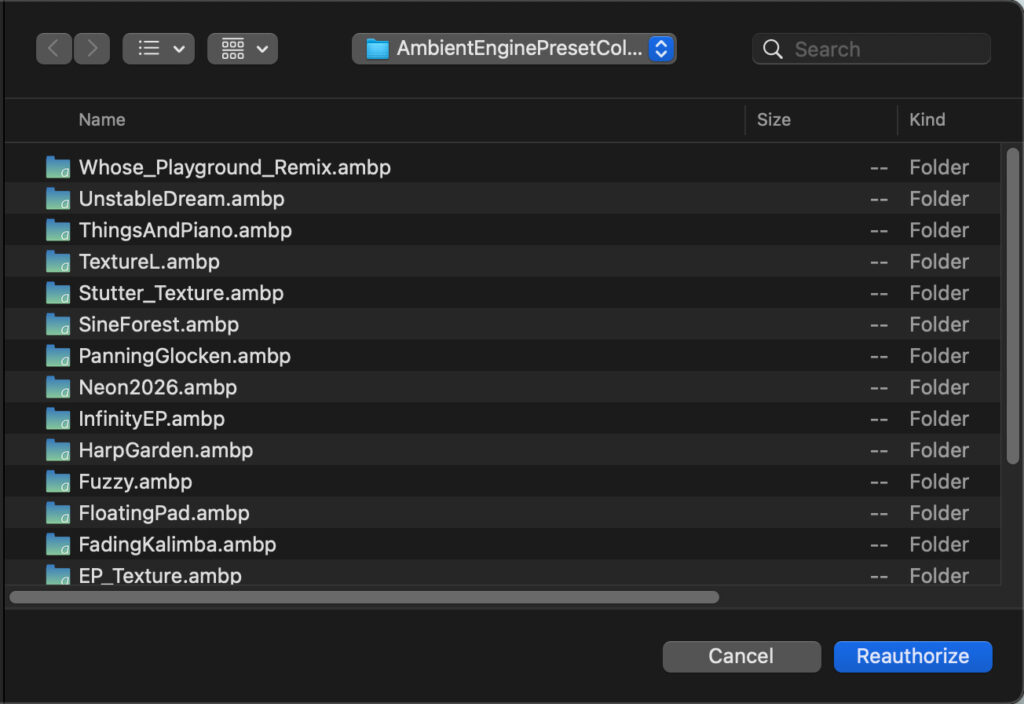
When you load a preset file, a screen with a “Reauthorize” button may appear.
When opening preset files created in a previous version after updating or upgrading the software, a file open dialog containing a “Reauthorize” button may appear due to file permission settings. In this case, please select the preset folder you wish to open and click the “Reauthorize” button.
Once saved with the latest version, this dialog will no longer appear.
I can’t display the window in the screen with a 13-inch MacBook Air
If the application window cannot be fully displayed on a 13-inch MacBook Air M3, etc., try System Settings > Display from enlarging the space.
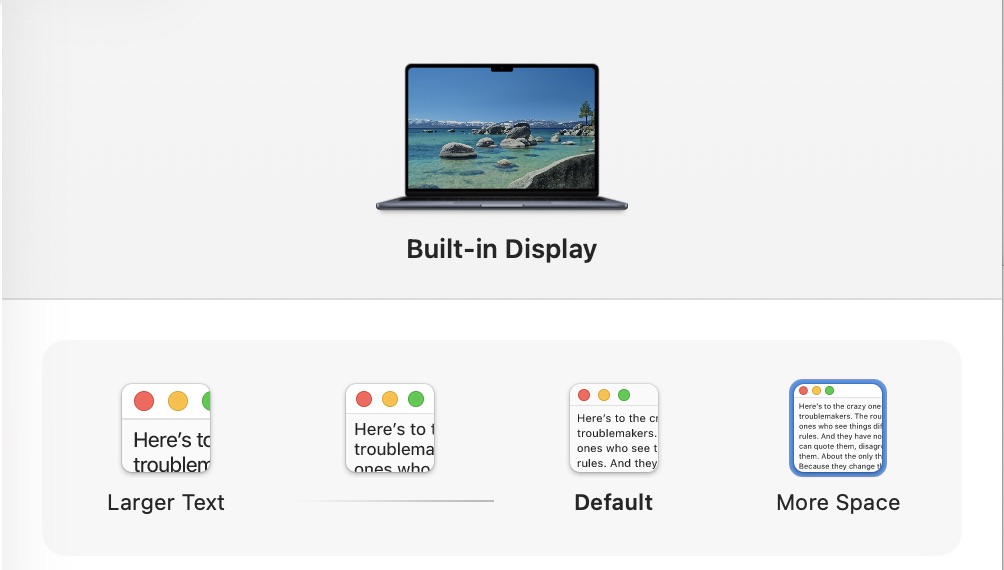
* Please use an external display when using this app on M1 MacBook / M1 MacBook Air
Where are the recorded sounds saved?
When recording is complete, you can select the save location and format (WAV / AIFF / M4A).
The files can be treated as normal audio files and can be used as is in DAWs and video editing software.
Are updates paid?
Updates after purchase are free throughout version 1.x.
Can I return or get a refund?
We are sorry, but due to the nature of this product as a downloadable product, we cannot accept returns or refunds after purchase.
Please be sure to check the video demo and sound samples before purchasing.
What is the responsibility if it does not work?
This software is provided as is.
The developer is not responsible for any damages (loss of data, equipment failure, business interruption, etc.) caused by the use or inability to use this software.
See the disclaimer for details.
Is there support?
We will respond to serious bugs and reproducible problems as much as possible.
However,
- Individual production methods
- Complete operation guarantee in a specific environment
are not provided.
Will a plug-in version (AU / VST) be released in the future?
It is undecided at this time.
Currently, Ambient Engine is designed to prioritize the experience as a standalone app.
Will a Windows or Linux version be released in the future?
It is undecided at this time.
Is MIDI supported?
Supported in version 1.1 and later.
Can I assign output channels for each sample player on an audio interface with multiple audio output channels?
It is not supported at this time.